Lesson

The impact of popups, overlays and interstitials on SEO

There's a lot to be dismantled and much to glean from Google’s recent algorithm update. In this post, we uncover the truth behind popups and your search rankings.

Shana Pilewski profile photo

Shana Pilewski

Vice President,

B2B Marketing ,

Mastercard

Popups, overlays, interstitials or modules — whatever you want to call them, they’ve long been used as an effective tactic for reducing cart/site abandonment, to recapture sales and generate more leads/conversions/revenue. Exit intent popups, alone, contributed to a 267% conversion uplift for one of our clients. 

Used to highlight a particular offer while helping narrow down the decision-making process for visitors, effective overlay experiences aim to provide value and in doing so, fulfill multiple revenue-based goals.

But like most marketing tactics, poor implementation, misuse and bad practices (especially on mobile where pages have less real estate) ruin it for everyone, leading to degraded user experiences. Pages where content is not easily accessible (i.e., include intrusive interstitials) during a transition from mobile search may not rank as high in search. Thankfully, you just need to follow a few new house rules when it comes to deploying your popups.

Not all popups are bad

And therefore, not all popups are subject to being penalized in organic search.

Additionally, while you might assume this boils down to sheer mobile vs. desktop implementation, it doesn’t. Nor does it apply to every popup on every page of a website.

In actuality, most people nowadays use search engines to find results through their mobile devices. Meaning, algorithms based on the desktop version of a site’s content seem pretty counterproductive. Or at least not conducive to understanding the actual relevance of a page for users who are accessing it on mobile.

Today, algorithms are primarily reliant on the mobile version of a site’s content to rank pages from that site. The switch from desktop made many examples of intrusive overlays apparent, frustrating users who expected easy access to what they clicked on from search but instead experienced obscured or concealed content.

Totally fair.

As marketers and mobile users ourselves, we can and should appreciate as well as participate in the good fight for better user experiences. But that still doesn’t mean we need to eradicate popups from our arsenal of engagement tactics. 

Here’s why:

  1. Customers use search engines to quickly find the best answers to their questions, putting a lot of significance on the first-page user experience. This does not include additional pages on the site, for example, a floating cart overlay appearing after a user has been browsing and added items for purchase.

Example of an acceptable interstitial used for age verification

But there are a few more considerations and practices to keep in mind as you reassess and update the current state of your popup game.


When to popup and when not to popup

While every marketer will hold different beliefs about proper overlay usage — largely influenced by the tactics they use and overall impact on a user’s time on their site — the presence of overlays shouldn't detract from potentially meaningful customer experiences.If these signals aren’t reflected in your popup “manifesto,” your UX beliefs aren’t going to save you from ranking poorly.

That’s why you should always avoid:

  1. Shifting above the fold content down in order to make room for a standalone interstitial
  2. Forcing a user to dismiss an overlay before they’ve even accessed content on the page
  3. Showing a modal that covers the main content almost immediately or upon user exploration

Again, these rules apply to those navigating from search who expect ease of access to content and preclude legal notifications as well as gated information.

Additionally, we’re distilling a few additional best practices to help our readers, prospects and customers build the best experiences possible.

  1. Avoid showing popups on landing pages from organic search
  2. Avoid showing popups from first page views from any source
  3. For exit-intent popups, avoid deployment upon users bouncing back to a search engine
  4. For exit-intent popups, implement a scroll or time-based trigger
  5. Use small, event-based triggered overlays when necessary
  6. All interstitials should only take up 15% of the user’s screen
  7. Popups should easily tap closed from an “X” button or upon clicking outside of the popup

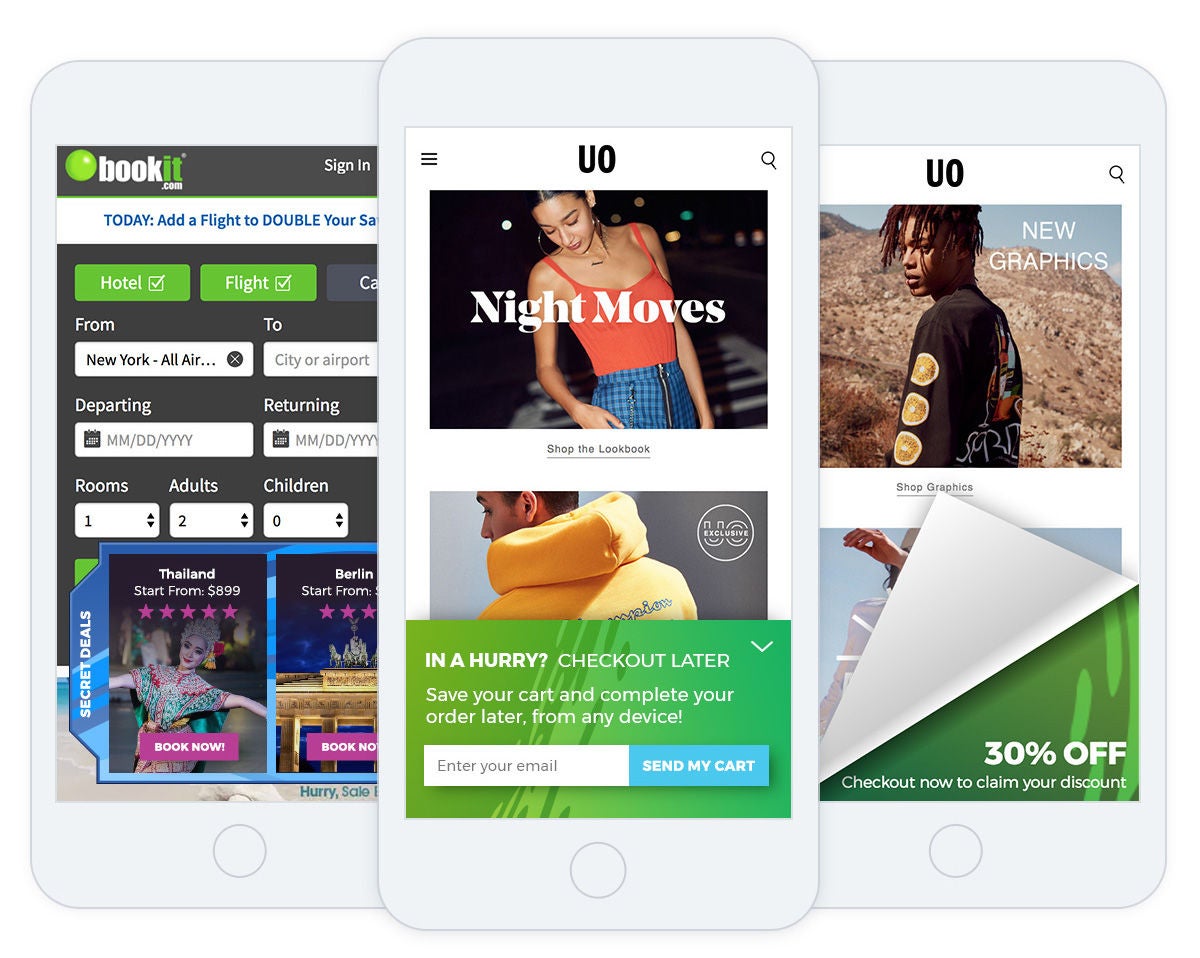
There are, in fact, a host of mobile-friendly use cases such as page curls, sliding drawers and expanding offers that can be used without fear of detracting from a site’s UX.

template

All the marketer needs to be concerned with, as always, is quality design, non-intrusive placement, valuable content and well-timed, data-insight-driven experiences. Whether for SEO or not, if a company wants to improve performance, revenue and conversions, a great UX will take into consideration all visitors regardless of traffic source or device.

Don’t have the design or development resources to create high-end overlays from scratch? Mastercard Dynamic Yield’s personalization template library includes ready-to-use HTML, CSS and Javascript experiences that marketers can customize accordingly and then set live.

Contact sales

Talk to an expert to learn how Mastercard can enhance your business through our products and services.

Mastercard