Article

How to get started with a Personalization Impact Report

Learn how to set up your report correctly from the start and build a strong foundation for accurate personalization measurement.

Published: April 23, 2026

Hannah Solmor profile photo

Hannah Solmor

Senior Customer Success Manager,

Mastercard

Woman analyzing data on her tablet

Beginning from scratch:

Before you proceed with enabling the report, first confirm the following:

  • There are at least 3 evergreen, high reach (over 40% of users) proven positive campaigns to be added to the report
    • This means these campaigns will not be turned off at the end of a sale period or otherwise
  • There is at least one campaign on each core page type:
    • Homepage
    • Category Page
    • Product Page
  • One of these campaigns uses some form of audience targeting
  • All campaigns have been live longer than 2 weeks

If the account has satisfied the above criteria, you can proceed with enabling the impact report by following the below steps:

1. Ask the account TAM to enable the Personalization Impact Report feature flag

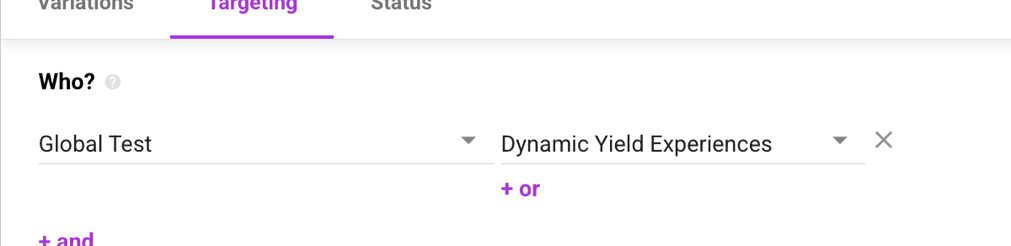
2. Add the “who” targeting condition, “Global Test, Dynamic Yield Experiences” to the experience level targeting of all desired campaigns:

template

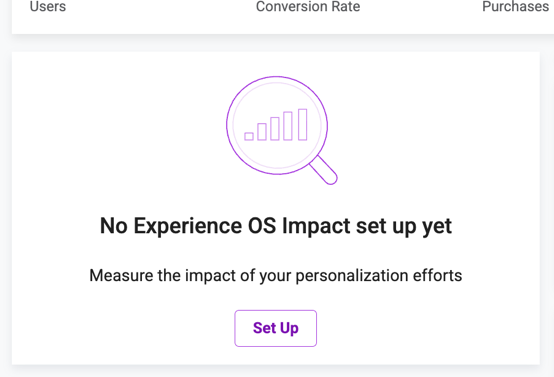
3. Enable the impact report by clicking “set up” on the widget on the account dashboard:

template

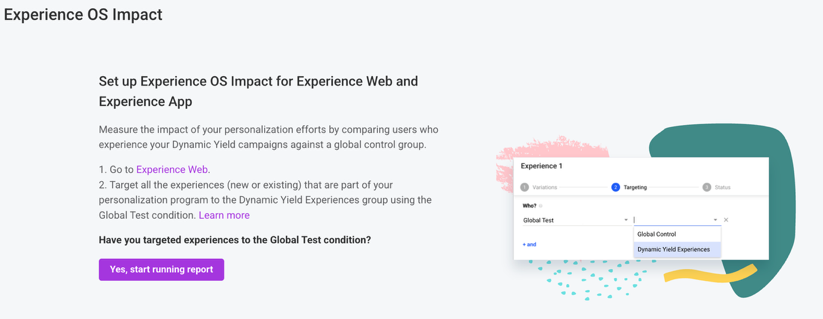
3. Click “Yes, start running report”

template

NOTE: Campaigns must be tagged and impact report enabled in rapid succession – do not complete only one step and stop.

Once enabled, review the 10 Principles Document with your point of contact. Emphasize that programs with strong value adhere to the core personalization principles:

  • High reach on core pages throughout the funnel
  • Primary Audience Targeting
  • Quality and impactful ideas for testing
  • Long term and evergreen approach
  • Reduce bounce and increase engagement


Migrating from the old GCG methodology:

Before you proceed with enabling the report, first confirm the following:

  • There are at least 3 evergreen, proven positive campaigns to be added to the report
    • This means these campaigns will not be turned off at the end of a sale period or otherwise
  • There is at least one campaign on each core page type:
    • Homepage
    • Category Page
    • Product Page
  • One of these campaigns uses some form of audience targeting
  • All campaigns have been live longer than 2 weeks

If the account has satisfied the above criteria, you can proceed with enabling the impact report by following the below steps:

1. Ask the account TAM to enable the Personalization Impact Report feature flag.

2. Turn off (pause or put in draft) the campaign connected to the old global control.

  • The old campaign can be used as a reference for historical data, but leaving it on will introduce bias.

3. Change the evaluator code connected to the currently live global control campaign to the code contained in this document.

4. Add the “who” targeting condition, “Global Test, Dynamic Yield Experiences” to the experience level targeting of any net new campaigns:

template

5. Enable the impact report by clicking “set up” on the widget on the account dashboard:

template
template

6. Over time, encourage your contact to change old evaluators within the where condition to instead leverage the new “who” condition – this is for consistency sake.

NOTE: Do all these steps within one call. Once the evaluator has been changed, you need to turn off the companion campaign. Changing the evaluator requires that you turn on the report quickly after. Do not complete only one step and stop.  

Once enabled, review the 10 Principles Document with your point of contact. Emphasize that programs with strong value adhere to the core personalization principles:

  • High reach on core pages throughout the funnel 
  • Primary Audience Targeting 
  • Quality and impactful ideas for testing 
  • Long term and evergreen approach 
  • Reduce bounce and increase engagement

Contact sales

Talk to an expert to learn how Mastercard can enhance your business through our products and services.

Mastercard