
December, 08, 2025
Introducing Mastercard Credit Intelligence
We’re thrilled to share that Small Business Credit Analytics - part of the Mastercard Credit Intelligence suite - is now available within the Mastercard Open Finance platform - bringing powerful insights to help small businesses and merchants in the U.S. unlock the capital they need to grow and thrive.
|
We’re proud to empower small business providers and financial institutions with actionable insights that put them in control - delivering the right data at the right moment for the best customer experience.
To find out how this integration can power smart decisions, reach out to your Client Success Manager for more details.
Enhancing reliability for legacy connections: Single Sessions and Fast Transaction Discovery (FTD)
We’re rolling out two key features designed to make your experience smoother and more efficient:
- Single Sessions
- Fast Transactions Discovery (FTD)
These enhancements improve data availability, reduce unnecessary Multi-Factor Authentication (MFA) prompts, and simplify onboarding without requiring changes to your existing workflow. These enhancements will be rolled out to a broad set of legacy data providers.
Early observations from a targeted set of financial institutions and partners indicate MFA failures within the first 5 minutes have shown a 75% improvement on an account basis.*
For more details, see the guide and FAQ below. For questions or support, please contact your Client Success Manager.
*These results are based on a limited population and may not reflect all FIs or partners. Rollout is ongoing, and improvements are expected to continue as coverage expands.
Stay connected: Latest OAuth changes for December
We've got you covered. See when financial institutions are expected to change statuses and what each update means for your connections.
Click below to explore what's changing.
U.S. Bank API migration timeline extended
In early November, we announced our upcoming upgrade to new APIs from U.S. Bank, with migration originally scheduled for mid-December.
Given the proximity to the holidays and code freezes at many companies, we worked with U.S. Bank to extend the timeline to minimize potential issues with TANs and avoid disruptions during this period.
We’re pleased to confirm that U.S. Bank has agreed to new timelines: the full migration will now be completed by March 31, 2026, using a phased rollout approach to ensure connections, especially TANs, are thoroughly tested.
We’ll provide additional documentation and guidance as the transition date approaches. If you have any questions, please contact your Client Success Manager.
2026 Open Finance & AI Summit
Join us in NYC on February 5th for the 2026 Open Finance & AI Summit! Connect with global industry experts and gain firsthand insights into the role of open finance in data-driven innovation, consent-based personalization, and the evolving role of AI and how it is revolutionizing financial experiences. |
|
|
November 19, 2025
Streamlined onboarding with OAuth details in the supported financial institutions table
We’ve made finding integration details even simpler. The enhanced table now combines Get Institutions API data and OAuth connection details into one streamlined view.
Once logged into Mastercard Developers with Test Drive Premium or Production access, you will be able to view which financial institutions support OAuth direct integration— helping you move forward with implementation quickly and confidently.
FI updates: Status and name changes
We’ve got you covered. Stay informed about upcoming financial institution status changes and name updates, so you know exactly what’s changing and how it may impact your connections.
Click below to explore the latest updates.
Upcoming deprecation: Get App Registration Status endpoint
In our ongoing effort to provide you with the best tools and support, we introduced two enhanced API endpoints last year. Based on your feedback, we've extended the deprecation date for the Get App Registration Status endpoint to provide more time for implementation.
New APIs:
- Get App Details: Easily retrieves the status of a submitted application on Mastercard's Open Finance Platform.
- Get App Registration Status by Institution: Returns the status of your application registration. If an institution ID is specified, its status is returned; otherwise, statuses for all institutions are returned.
Key details:
- Target deprecation: May 2026
- Impact: The Get App Registration Status endpoint will no longer be available after the deprecation date.
Action needed: If you’re still using the Get App Registration Status endpoint we recommend updating to our two new APIs before the deprecation date to avoid service disruption.
November 6, 2025
A more secure API experience is coming: U.S. Bank transition to Tokenized Account Number (TAN)
An important upgrade to our U.S. Bank API integration is expected by mid-December 2025. This will introduce Tokenized Account Numbers (TAN) - secure, application-specific representations of real account numbers, paired with unique routing numbers. TANs enhance data protection and will apply to newly consented users.
What's changing:
U.S. Bank's new implementation of TAN will be integrated into Mastercard's Open Finance Platform, joining Chase and PNC Bank who have already implemented TAN.
How it works:
TANs are returned in place of actual account and routing numbers during the Get Account ACH Details (V1) or Get Money Transfer Details (V3) API calls. Each TAN is paired with a unique 9-digit ABA routing number that cannot be used with real account data, adding an extra layer of security.
TAN Activation Schedule
- ACH Payments: TAN becomes active 15–35 minutes after issuance, as determined by U.S. Bank’s activation schedule.
- RTP Payments: TAN is immediately available for use.
- All ACH and RTP payments are supported using TAN.
Token Lifecycle & Revocation
- Fraud-Based Revocation: TAN is revoked only when account fraud is detected.
- Customer-Initiated Revocation: Currently not supported, but U.S. Bank may introduce this in the future.
- Data Sharing Connection Status: If the data sharing connection is revoked by a user or expires, the TAN remains active and payments will still go through, provided the TAN is in good standing.
- For ongoing updates, you may also refer to developer.usbank.com.
Compatibility & Migration
- Tokens issued via the new API version V6 are backwards compatible. No reauthentication is required for existing users.
- Non-tokenized account numbers will remain eligible for payments, but will be gradually replaced in aggregation as new accounts are discovered.
If you have any questions or would like assistance in preparing for the transition, please reach out to your Mastercard Client Success Manager or contact us via the Developer Portal. We’ll provide further documentation and guidance as the transition date approaches.
Metrics Dashboard: Real-time visibility for your API integrations
We recently introduced a new Metrics Dashboard that delivers clear, actionable API performance insights for developers, product managers, and operations teams. Each group can quickly spot trends, troubleshoot issues, and proactively manage integration health to ensure reliability and prevent disruptions.
Key features:
- Key aggregated data points such as API call volume and success rates of your integration and the platform
- Historical performance data by endpoint and each financial institution
- Visibility into integration errors, with clear categorization (e.g., system, customer, configuration) to help you quickly understand and address issues
- PDF exports for offline sharing and reporting
Ready to get started? Log in to Mastercard Developers and access the Metrics Dashboard in the top navigation bar.
OAuth connection updates
We’ve got you covered. Stay informed about upcoming financial institution status changes and name updates, so you know exactly what’s changing and how it may impact your connections.
Click below to explore the latest updates.
Enhanced Transaction Consumer Reporting Agency (CRA) Reports
We're excited to introduce a new way to customize your Transaction CRA (TACRA and TACRAH) reports. Effective immediately, you can apply enhanced filters to view the data that matters most to you.
What's new:
In addition to the existing transaction date range filter, you can now refine your reports using the following filters:
- Description/memo - exact match
- Transaction amount - from, to, or range
- Transaction category - up to 10 categories
No changes are required to begin using the new filters. To start using them, we recommend updating your report generation API call. When applied, filters will appear in the JSON and PDF outputs, while the report layout remains unchanged.
To get started, please refer to Transaction Report Generation API developer documentation to update the request body to use the new findTransaction parameter.
- Description/Memo :
This filter will perform an exact match to the “Description/Memo” field found in the PDF report. You may pass in a single “Description/Memo”.
- Amount :
This filter will return transactions whose transaction dollar amount fits the criteria. You may pass in an “Amount To”, “Amount From”, or both to create a range.
- Amount To: returns transactions less than or equal to this amount.
- Amount From: returns transactions greater than or equal to this amount.
- Range: returns transactions equal to or between the two amounts.
- Category :
This filter returns transactions whose “Category” matches what is passed in. You may pass in up to 10 categories in a single call. See the list of available Categories here.
Note: Use filters to focus on specific transaction patterns- such as rental payments by selecting the “Mortgage & Rent” category or filtering by a known amount. Many users start with a full report, then apply filters to refine the results.
October 23, 2025
Always on. Always Mastercard.
We're aware of the recent AWS outage that affected some services for other providers. We're pleased to share that our platform maintained normal operations with no disruption in service.
Thank you for your continued trust. We're committed to keeping things reliable so you can stay focused on what matters most.
Mastercard Data Connect error code enhancements
You asked, we listened. Mastercard Data Connect now features clearer, more actionable error codes to simplify troubleshooting and deliver a better experience.
What's new:
- Clearer in-app messages: Nearly 200 error messages have been revised for clarity and faster resolution.
- Enhanced documentation: A centralized list page, upgraded search functionality, and refreshed descriptions make information easier to find and understand.
- Streamlined quality: A structured intake process now ensures all error codes are consistently documented and maintained.
Explore the documentation below.
Mobile SDK update: Android OAuth bug fix
A new version of the Connect Android SDK (v3.0.6) is now available. This release resolves an issue where the OAuth popup did not automatically dismiss after users completed the OAuth journey on devices running Android OS 15 or higher when a redirectUrl or redirectUri was not provided.
If your integration uses the Android SDK, we recommend updating to the latest version as soon as possible to ensure optimal performance and a seamless user experience.
*Not applicable to web SDK users
OAuth connection updates
We've got you covered. See when financial institutions are expected to change statuses and what each update means for your connections.
Click below to explore what's changing.
October 9, 2025
Introducing the Mastercard API Metrics Dashboard
The insights you asked for, delivered. Our new API Metrics Dashboard is here! This new tool located within Mastercard Developers delivers a unified, real-time view of your integration's health, performance, and usage.
Support every step of the way:
|
Customize Connect updates
Three new configurations are now live! Designed to enhance support for you and your users.
*Available for Connect Full clients only |
|
|
A seamless new website experience
We’ve refreshed our website with you in mind. Visitors to Finicity.com will now be automatically directed to the relevant Open Finance pages on Mastercard.com.
This update makes it easier to find the resources you need- all in one trusted place.
FI updates: Status & name changes
We’ve got you covered. Stay informed about upcoming financial institution status changes and name updates, so you know exactly what’s changing and how it may impact your connections.
Click below to explore the latest updates.
Coming soon: Consumer Object update for Consumer Reporting Agency (CRA) reports
Based on your feedback, we're enhancing how consumer information is delivered in Consumer Reporting Agency (CRA) reports. A new consumer object will be included across all CRA report formats for a more consistent experience.
Previously, consumer details were only available in the PDF version. With this enhancement, JSON reports will also include this information.
The consumer object is populated from the consumer record created by customers of our CRA products and will include the following fields when available: first name, last name, address, city, state, zip code, phone, last 4 of SSN, and email.
This enhancement is scheduled to go into effect later this year. We'll share additional details and timing updates as we approach the release.
September 25, 2025
Unlock more with our updated Lend documentation
We've enhanced the documentation on Mastercard Developers for our suite of Lend products to help you get the most out of your integration. Now it's simpler to navigate, easier to find the right solution, and clearer how to bring that value to life.
What's new:
- Products overview: New content outlining how our Lend products address key customer needs and use cases.
- Getting started with Lend: A new onboarding section complements the Quick Start Guide for Open Finance.
- Reports list: Each product now has a dedicated page with detailed guidance and best practices.
- Mortgage use case: Updated content with clearer integration steps, including the Mortgage Implementation page.
More content is coming soon for Credit Card, Personal Lending, and Tenant Screening use cases.
PNC API responses
Effective immediately, PNC has removed the APY (Annual Percentage Yield) data element from its API responses. We have confirmed that this change will only affect deposit accounts, liability accounts will not be impacted.
What to expect:
The APY field will no longer be returned in API calls to the Account-info, Balances, or Investments products for PNC deposit accounts (including checking accounts, savings accounts, and CDs).
If you have any questions or need support, please reach out to your Client Success Manager.
OAuth connection updates
We've got you covered. See when financial institutions are expected to change statuses and what each update means for your connections.
Click below to explore what's changing.
September 11, 2025
Connect has evolved: Introducing Mastercard Data Connect
We’re thrilled to announce we’ve refreshed the name of our Open Finance product from Connect to Mastercard Data Connect. A name that speaks more clearly to the value it delivers and strengthens its connection to the Mastercard brand you rely on.
You’ll see this change reflected on the transparency screen and other related surfaces.
What this means for you:
- Enhanced security, a refreshed UI, and new features such as biometric login and device intelligence support.
- This is not a breaking change, and will not impact your integrations or functionality.
- If your user flows, documentation, or UI currently reference “Finicity” or “Connect” we recommend updating them to avoid any confusion.
If you have any questions or need assistance please reach out to your Client Success Manager.
Update: PNC Tokenized Account Numbers (TANs)
As a continuation of our earlier communication, we are providing an update on expirations of PNC authorizations and what this means for you.
What’s changed:
PNC is no longer disabling TANs when the user’s authorization to their PNC accounts expires. PNC is pausing TAN disablement until January 2026. This means that payments made using TANs will continue to process without disruption during this period. We will keep you informed as we hear more about PNC's plans following that date.
What this means for you:
- Connections will still expire if users do not reauthenticate within 365 days of linking their accounts. When a connection expires, you will no longer be able to pull account data (e.g., balances, transactions).
- While payments will continue to work, we strongly encourage users to reauthorize their accounts so you can maintain data access.
- Please continue using the Customer Authorization Details API to track authentication status and expiration dates for your users PNC accounts and other financial institutions.
Next steps:
- Monitor expirations with the Customer Authorization Details API.
- Re-authorize connections as needed to ensure uninterrupted data access. We encourage communicating with the user at least 30 days prior to the expiration date to re-authorize their connection.
- We are building a webhook service for expiration notifications and will keep you informed when that is live.
Please reach out to your Client Success Manger if you have any questions or need support with reauthentication.
OAuth connection updates
We’ve got you covered. See when financial institutions are expected to change statuses and what each update means for your connections.
Click below to explore what’s changing.
August 26, 2025
Reminder: Upcoming product name change: Mastercard Data Connect
We’re updating the name of our Open Finance product from Connect to Mastercard Data Connect effective September 11. You’ll see this change reflected on the transparency screen and other related surfaces.
What this means for you:
- This is not a breaking change, and will not impact your integrations or functionality.
- If your user flows, documentation, or UI currently reference “Finicity” or “Connect” we recommend updating them to avoid any confusion.
If you have any questions or need assistance please reach out to your Client Success Manager.
OAuth connection updates
We’ve got you covered. See when financial institutions are expected to change statuses and what each update means for your connections.
Click below to explore what’s changing.
August 14, 2025
Customize Connect: Logo editing tool
Our new logo editing feature is now live!
You now have enhanced control over how your logo appears within the Connect flow, making it easier than ever to align your branding with your visual experience. This new capability allows you to adjust your logo’s alignment and resize it for optimal display.
*Exclusively available for Connect Full clients
Take a closer look at our documentation to learn more.
OAuth connection updates
This month, several financial institutions will transition to new statuses. We’re highlighting who’s moving to beta, validated, migrating, or fully online – so you stay a step ahead and maintain seamless connections.
Click below to explore what’s changing.
Financial institution (FI) name changes
Click below to view financial institutions with recent name changes and please review to ensure accuracy when connecting to your accounts.
July 31, 2025
New feature: Payment Enablement Bundle
The new Payment Enablement Bundle (PEB) is here to help you build streamlined experiences for various payment use cases, such as direct ACH payments, recurring payments, secure account opening, credit-decisioning, loan funding and servicing.
This flexible endpoint combines multiple API services and intelligently responds to your input parameters.
PEB integration benefits:
- Minimizes development time
- Reduces API requests
- Streamlines complex workflows
Explore the details in our documentation. If you have any questions about this new feature, please reach out to your Client Success Manager.
Interactive Connect demo
We’ve made testing even easier! With Customize Connect you can now generate a non-production URL that looks and feels just like the live experience. This fully replicated flow lets you safely test and validate configuration changes in a secure environment, before going live in production.
Take a closer look in our documentation.
OAuth connection updates
We’ve recently made several changes across our OAuth connections. To ensure your integrations continue running smoothly, we recommend reviewing the latest changes.
As a new enhancement, we’re also now highlighting upcoming changes – giving you more visibility into what’s ahead.
Click below to explore what’s changing.
Mandatory API update for FCRA report retrieval
OFIN2026-002
We are updating our consumer report process to require the inclusion of a valid Permissible Purpose Code at the time of report delivery. This change affects all clients currently using outdated FCRA Get Reports API versions or submitting invalid Permissible Purpose Codes.
This requirement enhances how we validate the use of consumer reports under the Fair Credit Reporting Act (FCRA).
Key details:
- Mandatory for all partners using v1/v2 of the Get Reports API or sending invalid Permissible Purpose Codes
- List of valid Permissible Purpose Codes can be found here
- All partners must be using the v3 Get Reports API and passing a valid Permissible Purpose Code before April 30, 2026
After the deadline:
- Old API versions will be deprecated
- Any report request with an invalid Permissible Purpose Code will fail to deliver the report
Endpoints requiring migration:
- v1: GET /decisioning/v1/consumers/{consumerId}/reports/{reportId}
- v2: GET /decisioning/v2/consumers/{consumerId}/reports/{reportId}
- v1: GET /decisioning/v1/customers/{customerId}/reports/{reportId}
- v2: GET /decisioning/v2/customers/{customerId}/reports/{reportId}
New required endpoint:
- v3: GET /decisioning/v3/consumers/{consumerId}/reports/{reportId}
- v3: GET /decisioning/v3/customers/{customerId}/reports/{reportId}
After-hours hotline update: New number, same support
Our after-hours support hotline number has changed, and the new number is available now. This will replace the previous number moving forward, so please update your records.
If you experience a potential production-impacting issue outside of normal business hours, and have not received a communication from us please call:
New after-hours hotline: (332)-600-6840
When you dial in, you’ll be prompted to leave a voicemail. Be sure to include:
- Your case number
- Any key details that you think would be helpful
Your message will go straight to our 24×7 support team and leadership for immediate attention.
If you have any questions, please reach out to your Client Success Manager.
June 26, 2025
We are evolving – say hello to Mastercard Open Finance!
This new name better reflects the full range of financial solutions we offer – extending beyond banking to support a more inclusive, connected financial ecosystem. It’s a reflection of where we’re headed and the future we’re building together.
What changes for you? You’ll start seeing “Open Finance” used more and more across our communications – from newsletters and presentations to client conversations – as we align our language with the full scope of what we deliver.
Thank you for your partnership as we work together to empower consumers and small businesses to take control – not just of their bank data, but of their entire financial lives – through access to a broader, more connected set of financial data.
Connect your way: SDK or non-SDK
Unlock new possibilities with Connect, which now supports two flexible integration paths for generating Connect URL’s: SDK-based and non-SDK implementations.
A Software Development Kit (SDK) is a set of tools that helps developers integrate features more easily and efficiently.
- SDK integration: Simplifies your workflow by managing the user journey and tracking for you.
- Non-SDK integration: If your environment doesn’t support SDKs, this path offers the same functionality using webhooks and your own tools.
Click below to access step-by-step guidance in our documentation.
Now live: Payment History Report V2 in the Client Hub
We are excited to announce that our newly revamped Payment History Report v2 is now available in our no-code environment so you can quickly begin testing our reports with live customers.
With this report, lenders can gain deeper insights into small business customers – enabling more accurate risk assessments and better alignment of offers with their risk appetite.
Payment History Report retrieves up to 24 months of transaction history from connected accounts and calculates a risk score to help you identify and manage payment risks such as NSF/Overdraft or missed recurring payments.
If you have any questions or would like to explore how Payment History Report v2 can enhance your business offerings, please reach out to your Client Success Manager.
OAuth connection updates
We’ve recently made several changes across our OAuth connections. To ensure your integrations continue running smoothly, we recommend reviewing the latest changes.
Status updates:
- Bank of America – Migrating
- America First Credit Union – Migrating
- Citizens Bank – Online
- Suncoast Credit Union – Online
Click below to view the complete list of updates.
Billing Support has moved
We previously announced that we’re simplifying the way we support your billing needs. These updates are now being rolled out, and we’re here to ensure you have the guidance and resources you need every step of the way.
Mastercard Connect and Support Case Management (SCM) are now your dedicated channels for submitting and tracking all billing-related inquiries and requests.
Kindly discontinue sending support requests through OB.AcctsReceivable@mastercard.com as this inbox will soon be retired.
Need help or just getting started? Click below for guides, videos, and more.
June 11, 2025
Coming soon: Meet Mastercard Data Connect
You asked, and we listened. We’re changing the name of Finicity Connect (our tool to securely connect accounts) to Mastercard Data Connect. A name that speaks more clearly to the value it delivers and strengthens its connection to the Mastercard brand you rely on. You’ll continue to get the same reliable experience, now with a name that’s more connected to who we are.
This change is planned for late July 2025. We will be providing more information and guidance as the date approaches – stay tuned.
Customize Connect UX enhancement
Your experience is important to us. That’s why we’ve redesigned the edit experience screen in Customize Connect with a more intuitive layout and improved efficiency in mind.
The new layout prioritizes highlighting the Connect Screen, making it larger and easier to view configurations and track changes made.
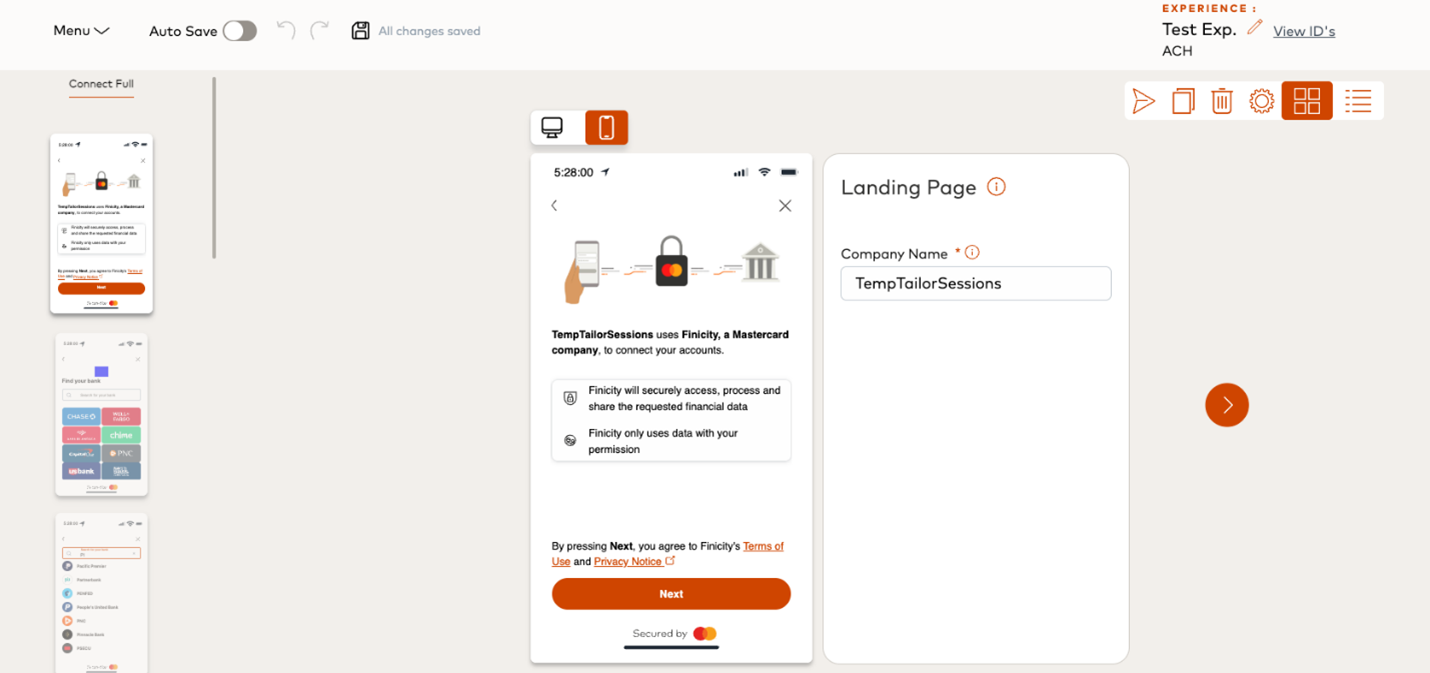
Customize Connect is a self-service portal that enables you to independently manage and update your Connect Full experiences at any time. If you’re using Connect Full in the U.S. market, you automatically have access with no additional setup required.
To learn more about Customize Connect, click below to view the documentation.
OAuth connection update
We’ve successfully completed the migration to the new OAuth connection with Michigan First Credit Union.
At this time, all accounts should be added to this connection, and any legacy connections should no longer be in use.
- FI ID: 177712 (Legacy ID – 6267)
- Status: Online
Please note the legacy ID – 6267 has been retired. If you have any questions, please reach out to your Client Success Manager.
Billing support change coming soon
We are simplifying the way we support your billing needs. By the end of June 2025, all billing inquiries should be managed through Mastercard Connect and Support Case Management (SCM).
Kindly discontinue sending support requests through OB.AcctsReceivable@mastercard.com as this inbox will be phased out.
Action needed: Registration is required for Mastercard Connect to access the Pricing and Billing Resource Center and Support Case Management (SCM).
How can I submit a billing inquiry or support questions?
- If you’re already set up in SCM, navigate to the following menu options: Operational Support > Billing & Fees, then choose one of the following options: Billing Event Clarification, Invoice request, or Reconciliation
- Not set up in SCM? Select store from the bottom left ribbon of the Mastercard Connect home page > search for Support Case Management and click Request. A confirmation page regarding your access request will be displayed
- To view and pay invoices, please continue to use the Pricing and Billing Resource Center application (PBRC).
Note- Users must log in to Mastercard Connect every (90) days to maintain active status
If you have questions about billing, getting set up in Mastercard Connect/SCM, or general support- we’ve got you covered. Check out the step-by-step guides below.
Mastercard Connect basics | SCM walkthrough video | SCM quick start guide
Upcoming deprecation: Get App Registration Status endpoint
In our ongoing effort to provide you with the best tools and support, we released two enhanced API endpoints last year. As part of this upgrade, we’ll be deprecating the Get App Registration Status endpoint to ensure a more streamlined experience.
New APIs:
- Get App Details: Easily retrieves the status of a submitted application along with additional details
- Get App Registration Status by Institution: Returns the status of your application registration. If an institution ID is specified, its status is returned; otherwise, statuses for all institutions are returned
Key details:
- Target deprecation: December 2025
- Impact: The Get App Registration Status endpoint will no longer be available after the deprecation date
- Action needed: If you’re still using the Get App Registration Status endpoint please update to our two new APIs before the deprecation date to avoid service disruption
May 14, 2025
Introducing Payment History Report v2
Are you curious about the payment behaviors and cash flow of your small business customers, whether new or existing? Do you want to help them grow, but worry about defaults or missed payments? With our newly revamped Payment History Report v2, lenders can gain deeper insights into small business customers – enabling more accurate risk assessments and better alignment of offers with their risk appetite.
Payment History Report retrieves up to 24 months of transaction history from connected accounts and calculates a risk score to identify and manage payment risks such as NSF/Overdraft or missed recurring payments.
What’s new:
- Seamless access and report ordering for business use cases without integration overhead
- Deeper insights into business payment behavior and cash flow
- More accurate and effective model training through improved data inputs
- Smoother alignment and integration of metrics with other business reports for cohesive analysis
If you have any questions or would like to explore how Payment History Report v2 can enhance your business offerings, please reach out to your Client Success Manager.
Returning User Experience (RUX) now live
Driven by your input, we’re excited to announce that Returning User Experience (RUX) is now live. RUX, creates a more personalized journey by remembering users’ data sharing choices and directing them to the most relevant financial institution based on their past sections.
How does RUX work?
With RUX enabled, Connect Full captures the user’s phone number either from the Create Customer API call or directly from the user in the Connect Full UI. Registered users who have shared accounts before are authenticated via an OTP sent to their phone and are then taken straight to a new FI selection screen based on their previously shared accounts.
What this means for your user journey:
- 98% of Connect Full Partner ID’s live with a phased rollout continuing over the next 4 weeks
- Connect Funnel success rates are unaffected by RUX enrollment screens
- RUX enrollment (phone number verification) has a 76% conversion rate
Click below to see the streamlined experience in action.
Now in Beta: Consumer Foresight is here
We are excited to announce the beta release of Consumer Foresight, our latest product designed to give you deeper insights into your customers’ spending patterns. This innovative solution provides detailed spending and predictive analytics at the consumer level, powered by exclusive insights from Mastercard’s data ecosystem.
How it works:
- Consumer transactions are first put into certain specified categories. Then, for each category, Mastercard provides the following analysis by consumer:
- Historical spending
- Benchmarked spend against other similar consumers
- Spend predictions 3, 6, 9, and 12 months into the future
- Consumer Foresight can power deeper personalization insights into your consumers spending to feed more compelling Personal Financial Management (PFM) solutions, marketing personalization, and encourages improved consumer financial behavior.
If you would like to explore how Consumer Foresight can support your business, please reach out to your Client Success Manager.
OAuth connection updates
We’ve recently made several status changes across our OAuth connections. We recommend reviewing these changes to stay fully informed and maintain a smooth integration experience.
Click below to explore the full list. If you have any questions, please reach out to your Client Success Manager.
Coming soon: Connect Fix configuration arrives this month
We are pleased to share that at the end of May 2025, we will be enabling the Connect Fix configuration to enhance your users’ experience.
This enhancement will leverage the Connect Fix flow without requiring direct integration with the Connect Fix endpoint. Users will be able to resolve broken accounts seamlessly through a Connect Full URL. No additional action is required from your side.
For those already integrated with the Connect Fix endpoint, everything will remain the same.
We’re confident this update will enhance your users’ experience, and we look forward to seeing the positive impact it brings.
If you have any questions, please reach out to your Client Success Manager.
Upcoming deprecation: Account Balance Check – Cached endpoint
As part of our ongoing commitment to enhancing your experience, we will be deprecating our Account Balance Check- Cached solution.
If you haven’t already, please migrate to the Account Balance Check- Live solution which delivers more accurate and timely account information. It also offers greater flexibility by allowing you to request a live or cached balance tailored to your use case.
Key details:
- Target deprecation: June 2025
- Impact: The Account Balance Check- Cached endpoint will no longer be available after the deprecation date
- Action needed: If you’re still using the cached endpoint, please update your integration before the deprecation date to avoid service disruptions
- Billing detail change: An administrative update will be made to your order form to reflect the removal of product code 11300-039. There is no change to the product or pricing or our Balance solutions, and you will continue to be billed based on your usage
Click below to review the documentation. If you have any questions, please reach out to your Client Success Manager.
May 8, 2025
Secure container required for OAuth authentication
As of May 4, 2025, Chase Bank (JPMorgan Chase) requires all OAuth account authentications to be initiated from within a supported secure web container (e.g., the platform’s secure browser) on mobile platforms.
What’s new:
- Enforcement date: Chase has begun enforcing this requirement as of May 4, 2025
- Prior communication: We first communicated this change in late 2023 to allow ample preparation time
- Security enhancement: This enforcement ensures that banking credentials and consent screens remain protected within a controlled environment
Why this matters:
Chase has removed support for certain types of WebView traffic. If your application is not using the most recent version of our Finicity Connect Mobile SDKs (iOS/Android/React Native), the Chase OAuth authentication flow may fail.
The latest versions of the Finicity SDKs support secure web containers, such as SFSafariViewController and Chrome Custom Tabs. We recommend updating your application to the latest version of the Finicity Connect Mobile SDKs to ensure compliance.
If your organization uses the Web SDK instead of the Finicity Connect Mobile SDKs, please refer to the documentation below for guidance on using WebViews with the Web SDK on iOS and Android.
For organizations with custom implementations not utilizing any Finicity Mobile SDKs, it’s essential to modify your application code to ensure Chase OAuth authentication sessions launch from within a browser or a supported secure container. While we cannot provide direct support for custom implementations, our documentation offers guidance.
Good news – You’re likely already compliant:
If you’ve been following our online documentation and using the Finicity Mobile SDKs, your implementation likely complies with this requirement. Ensure your SDK is updated to the latest version; otherwise, no additional action is needed.
Need to double-check?
Please review the following documentation to verify your setup:
- Mastercard (Finicity) SDK Integration – iOS
- Mastercard (Finicity) SDK Integration – Android
- Mastercard (Finicity) Using WebViews with the Web SDK
- Chase Documentation: Launching the OAuth Flow in a Secure Container
Next steps:
- Verify that your Chase OAuth flow launches from a secure container
- If you have any questions or need assistance, please submit a support ticket
Changes to PNC TAN revocation process
PNC Bank has updated its TAN (Tokenized Account Number) revocation process effective immediately.
What is a Tokenized Account Number (TAN)?
A Tokenized Account Number (TAN) is a secure, randomly generated number that replaces a user’s actual bank account number. TANs are used to facilitate payments – such as ACH or Real-Time Payments – without exposing sensitive account details. Each TAN is unique to a specific application or merchant and is mapped to the real account in a secure vault, enhancing security and reducing fraud risk.
What’s new:
- TANs are now revoked as soon as consent is withdrawn
- Previously, TANs remained active until they were operationally revoked
What this means:
A PNC Bank TAN will no longer qualify for payments if consent for the associated account is revoked under the following scenarios:
- End-user revokes consent directly with PNC (on the FI side)
- The customerID is deleted by making a call to the “Delete Customer” endpoint
- In this case, Finicity will initiate a follow-up API call to PNC’s revoke token endpoint, and the TAN will be revoked immediately
- A customer has consented to sharing a single account, and the client calls the “Delete Customer” API to remove that account
- In this case, Finicity will initiate a follow-up API call to PNC’s revoke token endpoint
- Since no other accounts are linked to the associated token, the TAN will be revoked immediately
Why this matters:
This change enhances security by ensuring account access is promptly and fully revoked when user consent is withdrawn. However, it also means that:
- Payment attempts using a revoked TAN will fail once consent has been removed
- Partners should confirm consent status prior to initiating any transactions using PNC TANs by checking the “aggregationStatusCode” associated to the account
Next steps:
- Update your customerID deletion logic to ensure that customerIDs linked to a PNC TAN account are not deleted until your payment activity has been completed
- Note: If the payment activity occurs on a regular cadence (for example, a monthly ACH payment), you must ensure that the customerID is not deleted from the Mastercard Open Banking production environment
- Review your current workflows to ensure they account for immediate TAN revocation upon consent withdrawal
- Update any internal documentation or customer-facing messaging (if applicable) to reflect this change
- If you have built custom implementations, verify your processes correctly handle TAN revocation scenarios
Questions?
If you have any questions or need further clarification, please reach out by submitting a support ticket
April 24, 2025
Introducing Bill Pay Switch!
Just launched, Bill Pay Switch enables consumers to easily update their recurring payment information with the merchants and billers they use regularly, such as subscription services, utilities and more.
Benefits:
- User-friendly dashboard to efficiently manage ACH or card on file payments
- Eliminates obstacles to switching financial institutions
- Prioritizes security and convenience for a seamless experience with a single secure session
- Leverages Return User Experience (RUX) allowing users to seamlessly pick up where they left off
Click below to learn more and see our Bill Pay Switch Demo in action! If you have any questions about this feature, please reach out to your Client Success Manager.
Balance and Cash Flow Analytics now available in the Client Hub
We are excited to announce the release of Balance Analytics and Cash Flow Analytics reports in the Mastercard Open Banking Client Hub for business and consumer use cases!
You can now generate Cash Flow Analytics and Balance Analytics without needing a direct integration into our APIs. This no-code solution makes it easy to start using our analytics to streamline and support your credit decisioning.
This offers customers the flexibility to access our reports more easily- either to test our analytics with live data prior to full implementation, or as a solution for those that prefer manual report generation.
This release is part of our ongoing efforts to enhance the experience and support we provide to our customers that serve small businesses and consumers.
Click below to learn more about the Client Hub.
OAuth connection updates
You may begin migrating legacy accounts to the new OAuth connection for Aspen Federal Credit Union. Please utilize our migration endpoint to transition from the legacy FI ID – 12341 to the new OAuth FI ID – 800305.
Please reach out to your Client Success Manger if you have any questions.
April 10, 2025
Returning User Experience Launch
We are excited to announce Returning User Experience (RUX) is now available for Connect Full clients and will be the default experience for new Connect Full integrations beginning April 15 with a phased rollout!
RUX creates a more personalized journey by remembering users’ data sharing choices and directing them to the most relevant financial institution based on their past selections.
What you’ll gain:
- Improved user experience
- Better account linking success rates
- Reduced user friction while enhancing trust and transparency for registered users
Click below to see how this simplifies your experience!
More flexibility and customization with Connect Components!
Now live! Connect Components are pre-built and embeddable, offering enhanced control and flexibility over your customer’s Connect experience.
You can design and test user experiences to match your brand, voice, and flow. This enables you to create a smoother, more seamless experience within your web application.
Turning your vision into reality with:
- Personalized user flow
- Seamless branding
- Instant customization
- Comprehensive testing
- Autonomous metrics management
Discover how to make the most of our latest feature- click below to view the documentation.
Get Institution by Routing Number now live!
Introducing the Get Institution by Routing Number API! This innovative tool allows partners to effortlessly search for a Mastercard Open Banking financial institution using a routing number. It provides users a reliable and straightforward way to locate their financial institution with confidence.
This API currently returns institutions that are ACH certified and where the routing number maps to a single institution. Expansion to all applicable institutions will follow Q2/Q3 2025.
Key benefits:
- New FI search method using a routing number
- Enhanced user confidence in selecting the correct FI
- Increased success rates unlocking more Mastercard Open Banking products
Generating reports at the end of Connect sessions release
We’ve enhanced our Connect Full report generation logic and successfully released the update on April 3, 2025.
If the consumer adds accounts, and either closes the Connect window, or allows the session time out without clicking the “Submit” button, the report will still be generated and a “done” webhook will be sent for you to retrieve the report like normal. We expect that this will result in an average of 5% more Connect sessions that result in reports generated.
As part of this update, we introduced a new eventTrigger field on Connect report-related “generating” and “done” webhooks. This field shows how the report generation was triggered, with options including; userSubmit, timeout, userExit, and userForceClose.
What’s new:
- Reports will be generated with all accounts added during the session, regardless of how the session concluded
- This is now the default for all Connect Full report generation experience, unless that experience has the “skipReport” feature enabled or has disabled this update
- A new field was added to indicate how the report generation was triggered
No action is required if you’re already using Connect to generate reports. If you have any questions, please reach out to your Client Success Manager.
Invoice update
As part of our transition to Mastercard Connect, we’ve enhanced our process for managing outstanding invoices. Our accounts receivable team will now contact partners with outstanding balances to stay on track and ensure timely reminders are communicated.
The notifications will be sent from the following email address:
We wanted to inform you about this new process- no action is required unless you have outstanding invoices, need assistance, or have any questions. If you do, please reach out to the contacts listed above.
FI name change updates
On a monthly basis, we review the names associated with financial institutions that we provide access to. This list contains the names of FIs that were updated as of April 1. Please take note of these changes to ensure accuracy when connecting to your financial institutions.
March 27, 2025
Introducing Data Enrichment
Data Enrichment can enhance your internally held (first party) financial account transaction data by categorizing transactions, identifying the entities and platforms involved, location data, logos, and website URLs.
This helps improve the usability of transaction data for various applications, such as personal financial management tools, fraud prevention, and customer segmentation analysis. The service can be used for enriching transactions in your own banking solutions, or those sourced through open banking providers other than Mastercard.
Click below to view the documentation. Please reach out to your Client Success Manager to learn more about how to utilize this new feature.
OAuth connection updates
As part of our ongoing commitment to enhancing your experience, the status field in the getInstitutions endpoint provides more detailed insights into an institution’s lifecycle.
New connections: Beta
- Michigan First Credit Union
- Suncoast Credit Union
Status change:
- Taekus – Online
Please reach out to your Client Success Manager if you have any questions.
Upcoming migration to DigiCert
Mastercard is migrating all Entrust certificates to DigiCert. Switching to a new Certificate Authority (CA) ensures compliance with the latest industry standards.
Please note the certificate/issuer for api.finicity.com will be updated on April 13.
We anticipate that most partners will not be affected by this change. However, for those with advanced certificate controls or customizations, adjustments may be needed to ensure seamless connectivity.
The change is set to take place between 11:30 PM MT on April 13, and 12:30 AM MT on April 14.
Overview | Mastercard announcement
Statement of dispute
We have enhanced our dispute management practices. Consumers can now add a statement to a closed dispute by logging into Finicity’s Consumer Portal.
All Fair Credit Reporting Act (FCRA) Consumer Reports support this functionality. The dispute statement will appear in future JSON and PDF reports unless the consumer removes it.
- JSON version: The statement will be in a new field called “disputeStatement”.
- PDF version: The statement will be near the top of the report in a section called “Statement of Dispute”.
We highly encourage all partners to update their implementation and processes to utilize this field.
If you have any questions, please reach out to your Client Success Manager.
March 13, 2025
nCino Verification platform rebuild
We’re thrilled to announce some exciting updates in the nCino Mortgage platform that enhance ease of use for our Mortgage Verification Service products.
Some of these features include:
- One click ordering of verifications
- Note: Unique to Mastercard, this can be configured to be a combined payroll and bank account permissioning experience (instead of sending two emails)
- Pre-close Verification of Employment (VOE) support
- Co-Borrower asset report ordering and more!
These enhancements are scheduled to go-live for all nCino Mortgage users on March 25. If you’d like to enable this enhancement sooner, please contact your nCino Client Success Manager.
For any other questions, please reach out to your Client Success Manager or contact us here at: OB.Mortgagepartnerships@mastercard.com.
To see the full list of enhancements, click below to get access to the release notes.
OAuth connection updates
The OAuth connection for America First Credit Union, FI ID: 177527, Legacy ID: 1495, has been live in Beta since February 14, 2025.
We have monitored this connection and confirmed there are no known issues in the productive environment. You may add customers to this connection with confidence.
Improved Account Owner population rate in refreshed reports
As part of our commitment to enhance data quality and outcomes for our report users, we are implementing an enhancement to increase the Account Owner population rate for refreshed bank data-based verification reports (VOA, VOI, VOAI, Cash Flow, etc).
Key details:
- Target release: Mid/Late April
- Benefits: Refreshed bank data-based verification reports will have an increase in Account Owner (AO) population rates
- Action needed: This will be automatically enabled for all report refreshes without customer action needed
FI name change updates
On a monthly basis, we review the names associated with financial institutions that we provide access to. This list contains the names of FIs that were updated as of March 3.
Please take note of these changes to ensure accuracy when connecting to your financial institutions.
February 27, 2025
Introducing Account Owner Matching!
As part of our dedication to enhancing value for our partners, we’ve introduced the Account Owner Matching feature within our verification product. This includes a new API endpoint to access matching data, available at no extra cost for all partners using our existing product.
To utilize this feature, you simply need to send the customer data you’ve already gathered through the new Account Owner Matching endpoint. Mastercard will then collect the account ownership information from the connected financial institution of the customer and compare it with your submitted data.
The response will include the same account ownership details sourced from the customer’s financial institution (such as name, address, email, and phone) along with a confidence score indicating how well the provided data elements match.
Action step: Please contact your Client Success Manager for further details on how to leverage this new feature.
OAuth connection updates
We are working with Vanguard Investment – FI ID 3078, to enhance the way we connect to their system. Unlike other integrations, there will not be a different institution ID. The change should be seamless, but we would like to proactively highlight the following:
- FI status: Online
- The financial institution will be available to all partners immediately, once complete
- The institution status will remain as online throughout the release
- Customers will need to re-authenticate using OAuth
- No migration will be needed
Please reach out to your Client Success Manager if you have any questions.
February 13, 2025
Support case portal migration coming soon!
We are migrating from the Finicity support portal (support.finicity.com) to Mastercard Connect and Support Case Management (SCM) by mid-2025.
Action required: You’ll first need to be enrolled in Mastercard Connect. Many clients and partners already set up access in 2024 as part of the billing migration.
Stay tuned for additional communications in the coming weeks with more details and instructions about your individual case migration window, and how you can prepare for the new SCM support portal.
What you need to do:
- If not already enrolled in Mastercard Connect, identify two people from your company to be Mastercard Connect Access Managers (previously known as Security Administrators.) They will handle user management and access approvals using the Access Manager/Security Administration app. Once identified, please submit the Enrollment Form 1145b, which is located here. For more information on the Access Manager role, please refer to the video here.
- Once the Access Managers are identified and set up, they can enroll new users in Mastercard Connect by sending an invite/accept email, or please ask users to Enroll in Mastercard Connect by clicking the Sign up or Sign in link.
How this change impacts and benefits you:
If you were set up for Mastercard Connect during the 2024 billing migration, you have already completed a major first step! We need you to validate that your users stay active by logging in every ninety (90) days, or these users will potentially need to re-enroll into Mastercard Connect if they become inactive.
Once access to Mastercard Connect is granted, we will coordinate and schedule an automatic migration of all current open cases plus the last twelve (12) months of closed cases from the support.finicity.com portal to Mastercard Connect and SCM. After the case migration is complete, access to support.finicity.com will be suspended and all users will be required to log in to Mastercard Connect to manage their support cases. We will communicate a freeze period window where we kindly ask that you do not open any new support cases or manage existing cases in the support.finicity.com portal for a period of 24-48 hours while we perform the migration.
NOTE: The timing of each case migration will generally fall over a weekend, but we reserve the right to customize the migration timing to accommodate for case volumes or other circumstances.
Additionally, Voice of the Customer (VoC) Surveys will be re-activated after your migration is complete, allowing clients to provide feedback, and Mastercard to receive Customer Satisfaction (CSAT) and Net Promoter Score (NPS) scores for closed cases. This feedback is invaluable to help enhance the customer experience with Mastercard products and services!
Migration overview | SCM quick start guide | SCM walkthrough video
OAuth connection updates
New connection: Phase: Beta
- Taekus
Status change: Phase: Migrating
- MCT Federal Credit Union
- Total Choice Federal Credit Union
- United Security Bank (CA) – Business
- The Farmers Bank (Greensboro, GA)
- WBH Federal Credit Union
- Citizens Bank of Missouri
- 4U Credit Union
- First Newton National Bank – Personal
These institutions reflect the recent updates we’ve made to the status field in the getInstitutions endpoint, offering more descriptive values to better capture an institution progression through its life cycle.
FI name change updates
Data Access update- fi connections
On a monthly basis, we review the names associated with financial institutions that we provide access to. This list contains the names of FIs that were updated as of February 3.
Please take note of these changes to ensure accuracy when connecting to your financial institutions.
Account Validation Assistant
The Experience Design Guide now includes UX recommendations and best practices for how to present the Account Validation Assistant (AVA) flow in your application.
Click below to view the documentation. If you have any questions, please reach out to your Client Success Manager.
January 30, 2025
Client/Partner support case portal changing soon!
As part of our commitment to providing you a better, more streamlined support experience, we are migrating from the Finicity support portal (support.finicity.com) to Mastercard Connect and Support Case Management (SCM) by the middle of 2025.
SCM is a robust ticket tracking system that allows you to easily manage support request cases in a single platform. Updates are made in real time and it’s our secure channel to exchange sensitive data. Your case history will be automatically migrated to the new portal, training materials and support will be provided as we get closer.
Action needed: You’ll first need to enroll in Mastercard Connect and identify the users that will be submitting technical support tickets.
What is Mastercard Connect?
Mastercard Connect serves as the single, unified entry point and secured global platform where Mastercard business customers come to onboard, enroll, service, and grow their business. Many clients and partners already set up their Mastercard Connect access in 2024 as part of the Billing migration and credit card payment setup.
Do I need to register for Mastercard Connect?
Yes, if you need to submit technical support tickets (general support, request for new institution, feature request), you will need to register your organization on Mastercard Connect.
How do I sign up for Mastercard Connect?
To register your organization for Mastercard Connect, please complete the registration form and return it to online_provisioning@mastercard.com . This form onboards your organization to Mastercard Connect by identifying two Access Managers – previously known as security administrators (SAs) – provisioning their access to Mastercard Connect. Access Managers will then manage user access for your organization, adding/approving access for users (as well as themselves) as necessary to perform the tasks mentioned above.
Once I get access to Mastercard Connect, when will we begin supporting cases through the new portal?
Your Client Success Manager will be communicating the migration schedule, training materials for Support Case Management, and will provide support throughout the migration. More details will be sent as we get closer to the migration.
Highlights for Reference
For all other matters, please reach out to your Client Success Manager.
Generating reports at the end of Connect sessions
Product update – Lending
We’re thrilled to announce an upcoming enhancement to our Connect Full report generation logic. This enhancement was designed with your input in mind, to ensure that reports can be generated with all accounts added during the session, regardless of how the session concluded.
Currently, reports are only generated if the user adds accounts and clicks the “Submit” button on the review screen. After this enhancement if the consumer adds accounts, and either closes the Connect window, or allows the session time out without clicking the “Submit” button, the report will still be generated and a “done” webhook will be sent for you to retrieve the report like normal. We expect that this will result in an average of 5% more Connect sessions that result in reports generated.
As part of this update, we will be introducing a new eventTrigger field on Connect report-related “generating” and “done” webhooks. This field will indicate how the report generation was triggered, and the options will be; userSubmit, timeout, userExit, and userForceClose.
Once this enhancement is launched it will be the default for all Connect Full report generation experiences, unless that experience has the “skipReport” feature enabled or has disabled this update.
Key details:
- Target release: End of March 2025
- Benefits: Reports will be generated with all accounts added during the session, regardless of how the session concluded. Currently, Connect only generates a report if the user clicks the “Submit” button on the review screen. As part of this update, a new field will be added to indicate how the report generation was triggered.
- Action needed: No action is required, if you’d like to take advantage of this enhancement. If you would like to opt out, or track the specific date of the release, please reach out to your Client Success Manager by March 14, 2025.
Stay tuned for more updates!
January 16, 2025
CFPB issues an order recognizing FDX as a standard setting body
Last week the Consumer Financial Protection Bureau (CFPB) officially recognized Financial Data Exchange (FDX) as a standard setting body under it’s 1033 Open Banking regulations.
As a cofounding organization via our subsidiary Finicity, and as part of the FDX board today, Mastercard has long supported the industry effort to standardize APIs.
We believe FDX is well-positioned to set these technical standards for scalable, safe and secure data sharing that responsibly supports the entire Open Banking ecosystem.
MCBS invoice update
Billing update
On January 13, 2025, we enhanced our current invoice layout to provide a simplified view of your billing details and improved clarity into the charges being assessed.
The first regular monthly billing cycle reflecting the new layout will be on February 9, 2025. Any off-cycle billing such as corrections that occurred on January 13, 2025, or after will reflect the new layout.
Click below to view the new layout and FAQ. If you have any questions please reach out to customer_support@mastercard.com
New OAuth connections
Data Access Update – FI connections
We have enabled new OAuth connections with the following Financial institutions:
Cogent Bank – Phase: Beta
America First Credit Union – Phase: Beta
Meow – Phase: Online
These institutions reflect the recent updates we’ve made to the status field in the getInstitutions endpoint, offering more descriptive values to better capture an institution progression through its life cycle.
FI name change updates
Data Access Update – FI connections
On a monthly basis, we review the names associated with financial institutions that we provide access to. This list contains the names of FIs that were updated as of January 2.
Please take note of these changes to ensure accuracy when connecting to your financial institutions.