
Help article

The End-user Payment Journey (Accept payment case)

1 min read

Markus Erasmus profile photo

Markus Erasmus

Customer Technical Services Analyst,

Mastercard

Below is the payment authorization flow end-users experience when making a payment.

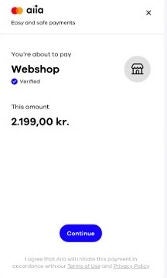
Screen 1
Screenshot of Aiia platform

The Payer sees an overview of the payment about to be made, showing recipients and amounts, the Payer accepts the Terms and Privacy Policy by clicking continue.

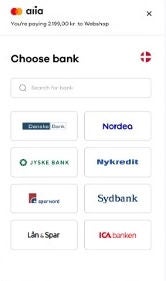
Screen 2
Screenshot of Aiia platform showing a list of banks

The most used banks for the specific market are presented to the Payer. The Payer may change the country as needed. If the bank they are looking for is not on the list, the Payer may type the bank name in the search field.

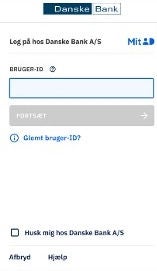
Screen 3
Screenshot of Aiia platform showing Danske bank

The payer is redirected to their chosen bank to authorize the transaction. This screen will differ depending on the individual financial institution. (The Payer may be required to provide 2 SCA’s (Strong Customer Authentications) depending on the solution of the specific provider.)

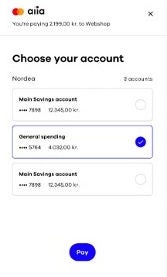
Screen 4
Screenshot of Aiia platform showing bank accounts

The Payer logs in to their bank and chooses an account.

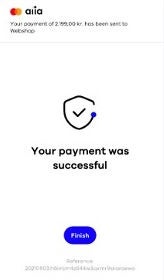
Screen 5
Screenshot of Aiia platform showing succesful payment

Shown here is where the payment authorization succeeded. Where this is not the case, the Payer is informed about the cause of the error and any next steps expected from the Payer.


With all clients following the same, basic flow as depicted above there are several customization options, which a client may choose to apply.

The objective behind this is to make the payment journey a natural and integrated part of the client’s flow.

Have more questions? Submit a request

Articles in this section

Articles in this section

Articles in this section

Related help articles

Related articles in this category